


1. Introduction to Domain and DNS Issues
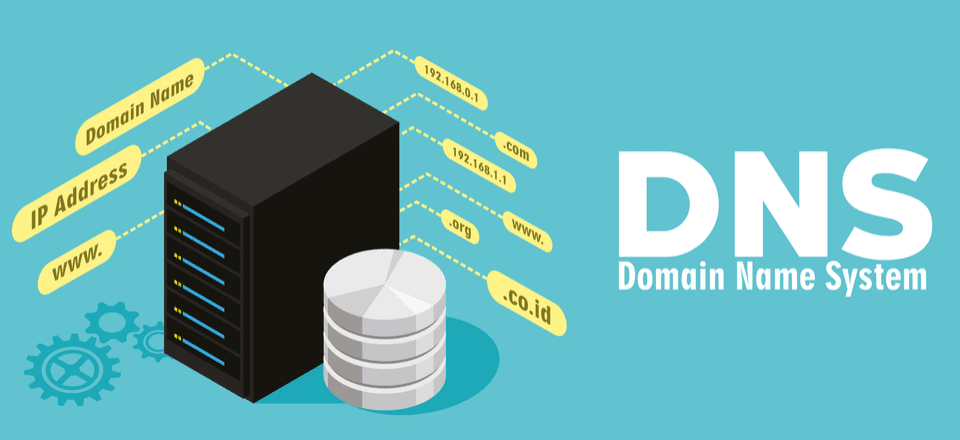
When users experience difficulty accessing a website, the problem often stems from issues with the domain name or DNS settings. A domain is essentially your website’s address on the internet, while DNS acts as the phonebook that translates that address into an IP address, which the web browser can use to load the site.
Domain and DNS issues can cause a variety of problems, such as slow website loading, failure to access the website, or redirection to incorrect pages. Understanding the nature of these problems and how to address them is essential for maintaining smooth website operation and ensuring users can consistently reach your site.
2. Common Domain Issues Affecting Website Accessibility
Several domain-related issues can impact website accessibility. The most common ones include:
1. Domain Expiration
A domain name must be renewed periodically. If the domain expires and is not renewed, your website becomes inaccessible. Always set reminders to renew your domain before it expires.
2. Incorrect DNS Settings
If the DNS records are misconfigured, users may not be able to access your website. This can happen when DNS servers are set incorrectly or when records like A, CNAME, or MX are missing or outdated.
3. Domain Propagation Delays
When a domain is newly registered or DNS settings are changed, it can take up to 48 hours for the changes to propagate across the internet. During this period, users may experience intermittent access or be unable to reach the site.
4. Domain Name System (DNS) Hijacking
In rare cases, attackers may hijack the DNS settings of a domain to redirect traffic to malicious websites. Regular monitoring of DNS settings is crucial to detect and address this threat promptly.
3. How DNS Works and Its Role in Website Accessibility
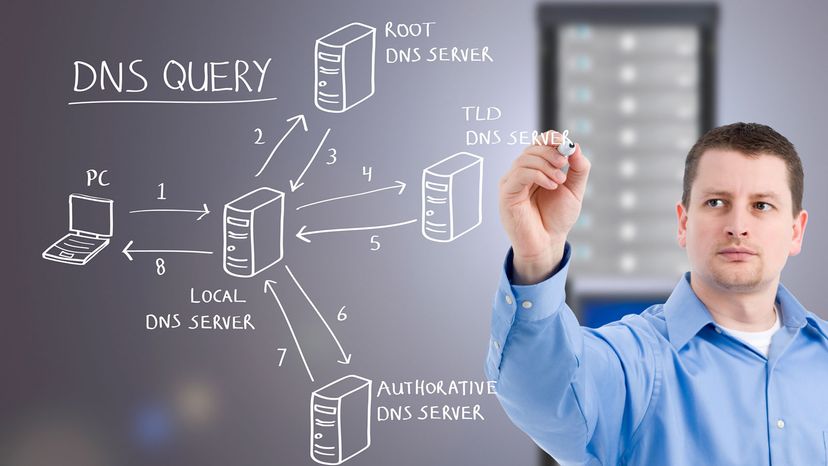
The Domain Name System (DNS) is a fundamental part of the internet that translates human-readable domain names into machine-readable IP addresses. For example, when a user types in www.yourwebsite.com, the DNS system converts that address into an IP address that directs the user’s browser to the correct server where the website resides.
If DNS settings are incorrect or disrupted, users might encounter errors such as "DNS Server Not Found" or "Page Not Found." Properly configuring DNS settings ensures that users can access the site quickly and reliably.
How DNS Settings Impact Website Accessibility
- A Records (Address Records): Directs traffic to your web hosting server’s IP address.
- MX Records (Mail Exchange Records): Directs email to the correct mail server.
- CNAME Records (Canonical Name Records): Maps aliases to primary domain names.
- NS Records (Name Server Records): Indicates which DNS servers are responsible for the domain.
When any of these records are misconfigured or missing, the website may be inaccessible or fail to perform as expected.
4. Troubleshooting DNS Problems
To resolve DNS-related issues, follow these troubleshooting steps:
1. Check Domain Expiration
Ensure your domain is up-to-date by checking the expiration date. You can verify this through your domain registrar’s dashboard.
2. Verify DNS Settings
Use online tools like MXToolbox or DNSstuff to verify your DNS records. Check that all relevant records (A, MX, CNAME, etc.) are correct and pointing to the correct servers.
3. Clear DNS Cache
Sometimes, cached DNS information can cause access issues. Clear your browser’s DNS cache or flush your system’s DNS cache to ensure that it retrieves the latest information.
4. Use a Different DNS Server
Switch to a reliable public DNS server, such as Google’s DNS (8.8.8.8 and 8.8.4.4) or Cloudflare’s (1.1.1.1), to resolve slow or unreliable DNS issues.
5. Check for DNS Propagation Delays
If you've recently made DNS changes, remember that it can take up to 48 hours for those changes to propagate globally. If it's been less time than that, the issue may resolve itself once propagation is complete.
5. Best Practices for Managing Domain and DNS Settings
To avoid future domain and DNS-related issues, follow these best practices:
1. Regularly Monitor Domain Expiration Dates
Set up automated renewal reminders for your domain, and consider enabling auto-renewal to avoid unintentional expiration.
2. Backup DNS Settings
Keep a record of your DNS settings, including A, MX, and CNAME records, so you can easily restore them in case of accidental changes or issues.
3. Secure Your Domain Registrar Account
Enable two-factor authentication (2FA) and use a strong password to secure your domain registrar account. This protects you from unauthorized changes to your DNS settings.
4. Use DNS Monitoring Tools
Consider using DNS monitoring services that alert you to any changes or downtime in your DNS records. These tools help catch issues early before they affect website accessibility.
5. Use Reliable Hosting and DNS Providers
Choose reputable hosting and DNS service providers with good track records of uptime and security. This reduces the chances of DNS failures or issues arising from service outages.
6. When to Contact Your Hosting Provider or Domain Registrar
If troubleshooting on your own doesn’t resolve the issue, it may be time to reach out to your hosting provider or domain registrar for support. Common reasons to contact support include:
1. Persistent DNS Issues
If DNS settings appear to be correct but your website is still inaccessible, your hosting provider may be able to diagnose server-related issues.
2. Domain Renewal or Transfer Problems
Contact your domain registrar if you're having trouble renewing or transferring your domain.
3. Server or Network Outages
If DNS settings seem correct, the issue may be with the web hosting server. Your hosting provider can inform you if they are experiencing any network or server outages.
By seeking support when necessary, you can resolve domain and DNS issues quickly and minimize website downtime.








Comments 0
Sign in to join the conversation.
No comments yet. Be the first to say something.