


Introduction
Managing a web hosting business requires efficiency in billing, client management, domain registration, and technical support. WHMCS (Web Host Manager Complete Solution) is an industry-leading platform that automates these tasks, allowing web hosting providers to focus on growth and customer satisfaction. This guide explores the features, benefits, and setup process of WHMCS, helping businesses streamline operations and improve service delivery.

1. What is WHMCS?
WHMCS is a billing and automation platform tailored for web hosting businesses. It handles invoicing, domain management, customer support, and account provisioning, making it a must-have tool for hosting providers.
Key Functions of WHMCS:
-
Automated Billing: Generates invoices, processes payments, and sends reminders.
-
Client Management: Stores customer details and tracks interactions.
-
Domain Registration: Integrates with domain registrars for seamless management.
-
Support System: Includes a ticketing system for customer queries.
-
Hosting Account Management: Automates provisioning and suspension of hosting accounts.

2. Why Use WHMCS?
WHMCS simplifies and automates key processes, helping hosting businesses save time and improve efficiency.
Key Benefits:
-
Time-Saving Automation: Reduces manual work by automating billing, account provisioning, and domain management.
-
Scalability: Supports business growth by integrating with multiple hosting platforms and payment gateways.
-
Secure Transactions: Uses advanced security measures for safe payment processing.
-
Professional Invoicing: Generates and sends branded invoices automatically.
-
Customizable & Extensible: Offers plugins and modules to enhance functionality.

3. Key Features of WHMCS
WHMCS provides various features to help web hosts manage their business efficiently.
Billing & Payments
-
Supports multiple currencies and payment gateways like PayPal, Stripe, and Bitcoin.
-
Automates recurring billing and overdue reminders.
-
Generates detailed financial reports for business tracking.
Domain Management
-
Integrates with leading domain registrars like Namecheap, GoDaddy, and Enom.
-
Automates domain registration, renewal, and transfers.
-
Provides WHOIS lookup and domain search functionality.
Client Management & Support
-
Built-in CRM system for storing customer details.
-
Integrated support ticket system with email piping.
-
Allows automated client email notifications and updates.
Hosting Automation
-
Integrates with cPanel, Plesk, DirectAdmin, and more.
-
Automatically creates, suspends, and terminates hosting accounts.
-
Offers self-service client area for customers to manage services.
Security & Compliance
-
Supports two-factor authentication (2FA) for added security.
-
Provides SSL certificate management and domain security options.
-
Ensures GDPR compliance for data protection.

4. How to Set Up WHMCS
Step 1: Purchase and Install WHMCS
-
Buy a WHMCS license from the official website.
-
Download the WHMCS package and upload it to your web server.
-
Create a MySQL database and configure the database settings.
-
Run the WHMCS installation wizard.
Step 2: Configure Basic Settings
-
Set up your company name, logo, and email settings.
-
Configure your default currency and payment gateways.
-
Customize your client registration and security settings.
Step 3: Integrate with Hosting Services
-
Connect WHMCS with cPanel, Plesk, or DirectAdmin.
-
Enable automatic account provisioning and hosting package settings.
-
Set up cron jobs for automation.
Step 4: Configure Domain & Payment Gateways
-
Link WHMCS with domain registrars to automate domain sales.
-
Enable PayPal, Stripe, or other payment gateways for transactions.
-
Test the billing system to ensure smooth invoicing.
Step 5: Customize Client Area & Support System
-
Personalize the client dashboard with branding.
-
Set up support departments and email ticketing.
-
Enable knowledgebase articles to assist customers.
Step 6: Test & Launch
-
Create a test order to verify the billing process.
-
Check email notifications, payment processing, and automation.
-
Officially launch WHMCS for your hosting business.
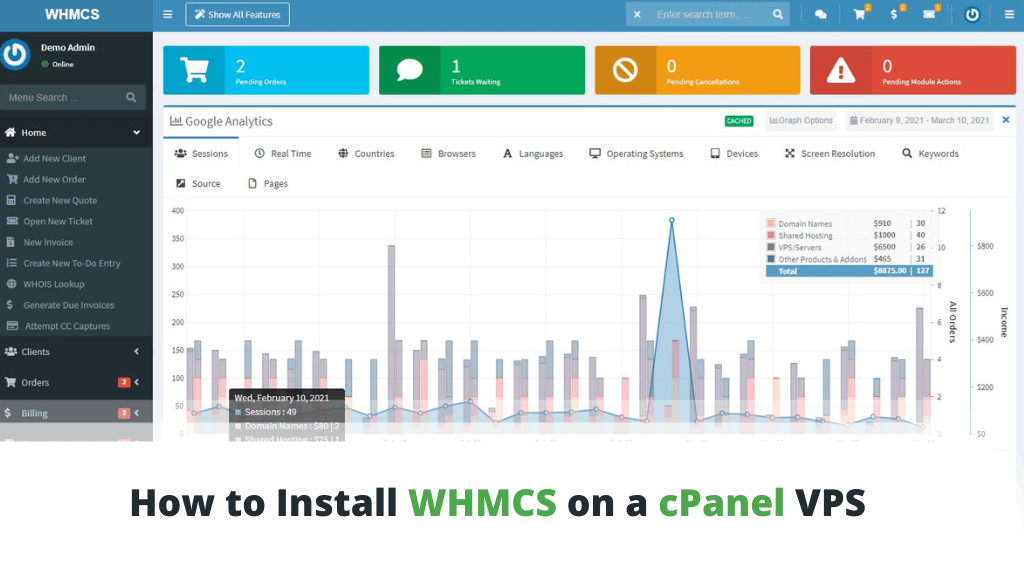
5. Best Practices for Managing WHMCS
To maximize the efficiency of WHMCS, follow these best practices:
-
Regular Updates: Keep WHMCS and its plugins up to date.
-
Security Measures: Use SSL, two-factor authentication, and backups.
-
Monitor Automation Logs: Check logs for errors in billing or provisioning.
-
Optimize Support System: Use automation to improve response times.
-
Analyze Reports: Utilize WHMCS analytics to track revenue and customer growth.

6. Conclusion
WHMCS is a must-have tool for web hosting businesses looking to streamline operations, automate billing, and enhance customer support. With its robust features and integrations, WHMCS simplifies business management and provides a seamless experience for both administrators and clients. By implementing WHMCS correctly, hosting providers can focus on growing their business while ensuring smooth and efficient service delivery.






Comments 0
Sign in to join the conversation.
No comments yet. Be the first to say something.